
Get your injection-molded CAD ready in 3 clicks.
Pick your Class A surface. Odin derives the pull direction and flags every draft angle, undercut, and thin-wall issue.
See it on your own part.
STEP in. Class A picked. Full draft angle, undercut, and thin-wall report in under a minute.
- Step 1Upload CADSTEP or native CAD.
- Step 2Pick Class A surfacePull direction derived from your cosmetic face.
- Step 3Review + apply fixesDraft angle, undercut, and thin-wall issues with recommended fixes.
- Step 4Export file + reportUpdated CAD plus a full report.
Four checks. All computed against your pull direction.
Change the Class A — pull direction moves, every check recomputes. Actionable fixes, not textbook warnings.
Per-face draft-angle measurement against the pull direction, flagged against injection-molding minimums.
- · Per-face angle measurement
- · Parting line impact flagged
- · Texture-aware minimums (e.g. MT-11020)coming
Features that block ejection. Redesign vs. side-action triage so you know what needs what.
- · Ejection-blocker detection by pull vector
- · Redesign vs. side-action triage
- · Updates live when Class A changes
Sharp internal corners concentrate stress. Odin will flag them and auto-generate fillets sized to wall thickness.
- · Sharp internal corner detection
- · Radius sized from wall thickness
- · Generated fillet exported with the file
Region-by-region thickness map. Sections at risk of short shots, sink, or warpage get flagged.
- · Per-region thickness heatmap
- · Flow length & sink risk flags
- · Per-polymer thresholdscoming
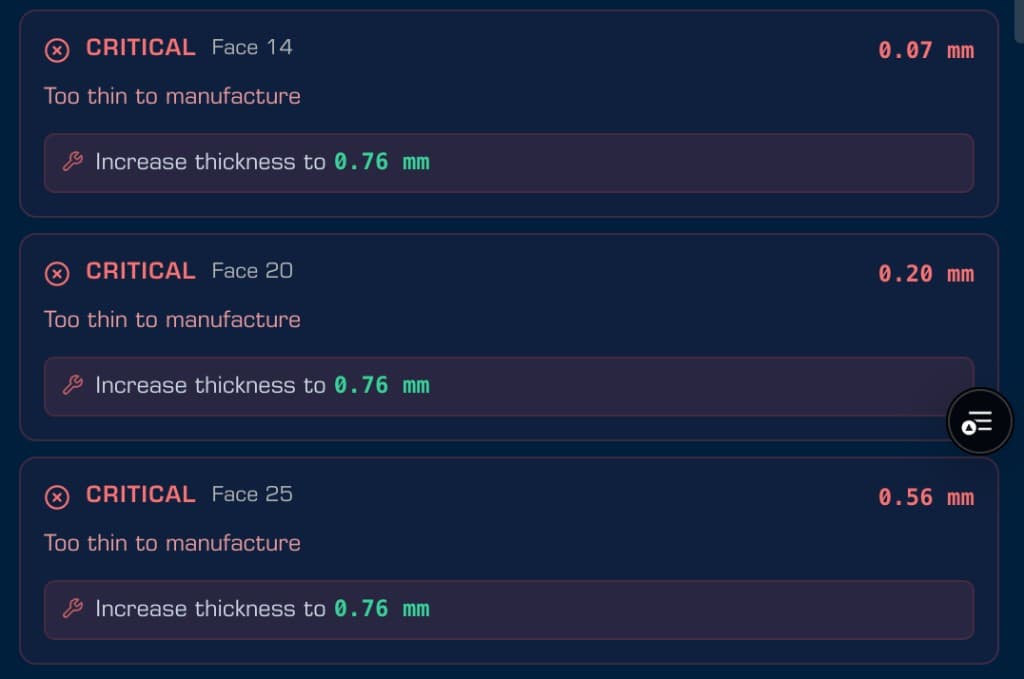
Designer-readable issues. One fix per line.
Every issue names a face, a severity, and a fix you can apply. No raw FEA dumps.
- ·Severity tags so the worst issues surface first
- ·Per-face callouts you can click into the 3D view
- ·Recommended fix with a target value, not a textbook warning
Live in Odin · fillet, texture & material-aware checks coming next
Class A aware today. Material-aware next.
Cosmetic vs. structural drives pull direction, parting line, and draft angles today. Polymer-specific thresholds roll out next.
Class A vs Class B surfaces
LiveMarks the cosmetic surface. Drives pull direction, parting-line avoidance, and visible-face draft-angle bias. Texture-aware tightening coming next.
Material-aware thresholds
Pick PC/ABS, Nylon, PP — Odin recalibrates every threshold with material-specific recommendations.
Integrate Odin at your company's standards.
Custom DFM rules, polymer thresholds, SSO, audit trail, on-prem? Tell us your workflow — we'll scope it. Try Odin free meanwhile.
Email us about custom DFM rules, SSO, audit trail, on-prem, or other team needs — we'll scope it.
Contact
info@vasar.ioFrequently asked questions
- What does Odin check for injection molding?
- Draft-angle violations by surface, undercuts that block ejection, and thin-wall regions at risk of short shots or sink. Fillet detection and material-calibrated thresholds roll out next.
- How does Odin determine the pull direction?
- You pick the Class A (cosmetic) surface. Odin derives the pull direction; every check recomputes against it. Change the Class A and the analysis updates live.
- Does Odin auto-fix the part?
- Detection for drafts, undercuts, and thin walls is live with designer-readable recommendations. Fillet detection, auto-generation, and full geometry auto-fix roll out next.
- What is an Class A surface and why does Odin care?
- Class A is the cosmetic, user-visible surface of a molded part — it needs tighter draft angles and can't host the parting line. Odin uses your Class A pick to derive pull direction, avoid the parting line, and bias visible-face draft-angle thresholds. Texture-aware tightening rolls out next.
- Does Odin do material-specific analysis?
- Not yet. Odin uses sensible injection-molding defaults today; per-polymer thresholds, flow-length warnings, and sink-mark risk roll out next. Enterprise customers can request custom polymer libraries.
- What does Odin export?
- The updated CAD plus a human-readable report of every issue, severity, face, and fix applied.